How to print text messages for court from an iPhone
Published September 16, 2026 · Updated October 28, 2026
Short answer: screenshot the conversation and turn the screenshots into a numbered transcript with the screenshots attached. With a Mac you can also print it from Messages, and a backup-based export tool on a computer prints the whole history.
You have three realistic options. Which one fits depends on how many messages you have and whether you have a computer.
Option 1: Screenshots, organised into a transcript (most people)
- Open the conversation in Messages and scroll to the oldest message you need.
- Drag any bubble to the left and hold to reveal the exact time next to every message, then take the screenshot while the times are showing. Times matter to judges.
- Take a screenshot (side button + volume up). Scroll so the last bubble of the previous screenshot is still visible at the top, then screenshot again. Repeat to the newest message. Overlap is good: it proves nothing was skipped.
- Do not crop, mark up or edit the images. Keep the originals.
- Upload the screenshots to Court Texts. It reads each bubble, removes the overlap, orders the messages by date and time, and builds a PDF with a numbered transcript and every screenshot attached as an exhibit.
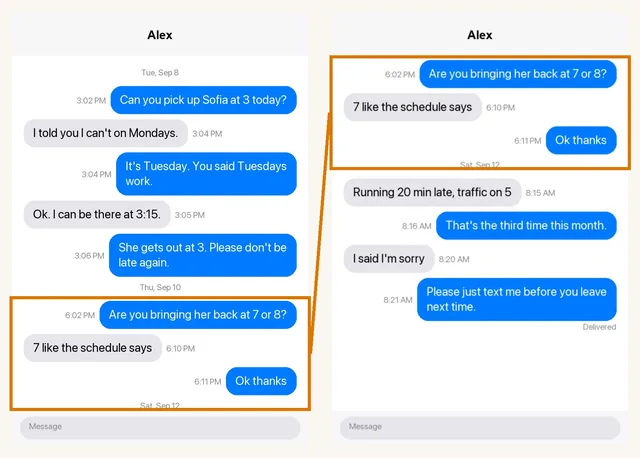
Why not just print the screenshots? You can, and for five or ten messages that is fine. For a longer thread, a judge is looking at dozens of unnumbered images with no way to reference "the message where he said X". A transcript with exhibit references fixes that and takes minutes.
Option 2: Print to PDF from the Mac Messages app
If your Messages sync to a Mac, open the conversation, choose File › Print, and save as PDF. This is free but produces long pages with no message numbering, and it only works if iCloud Messages syncing is turned on.
Can you pick up Sofia at 3 today?
I told you I can't on Tuesdays.
Option 3: A backup-based export tool
Desktop programs such as Decipher TextMessage read an iPhone backup and export a full conversation with contact names and phone numbers on every message. This is the most complete option and the best one if the other side may argue the messages were altered, because it comes from the device database rather than from images. It costs about $30, needs a Mac or Windows computer and an iPhone backup, and takes an hour or two to set up.
Or record the screen instead of taking screenshots
If the conversation is long, a screen recording is the faster way to capture it and it avoids the usual gaps between screenshots. Open Control Centre, tap the screen-record button, open the chat, scroll slowly from the oldest message you need to the newest, then stop the recording. It is saved to Photos as a video. Court Texts accepts the video the same way it accepts screenshots: it samples the recording into overlapping frames on your phone and reads them. Keep the scrolling steady and do not open other screens while recording; a recording longer than ten minutes should be split in two.
Printing iPhone texts for any purpose, not just court
The same routes work whether the messages are for a court, an insurer, a landlord, HR or simply to keep. On the iPhone itself there is no print button in Messages, so the choices are:
- Screenshots, then print. Press the side button and volume up together, scroll, repeat. Open Photos, select the screenshots, tap Share, then Print, and AirPrint sends them to a nearby printer, or choose Save to Files for a PDF. Fine for a few screens; the dates at the top of a conversation scroll away, so check each screenshot shows when the messages were sent.
- A Mac signed in to the same Apple ID. With Messages in iCloud turned on, open the conversation in Messages on the Mac, scroll back to where you want to start, and choose File, then Print, then Save as PDF. It is free; times are shown only where the Mac shows them, not on every message.
- A desktop export program. For years of messages, programs that read an iPhone backup on a Mac or PC print whole conversations with a time on every message. We compare them in the best apps to print text messages.
- A transcript from screenshots or a screen recording. For a long thread you need to read or hand to someone, Court Texts turns the screenshots into a typed, numbered list of messages with dates and times, and attaches the screenshots.
To see the exact time of any message before you screenshot, drag the conversation to the left; the times appear beside each bubble.
How to present the messages
- Put messages in chronological order and number them.
- Show who sent each message, with the date and time.
- Attach the original screenshots so any line can be checked.
- Add a short statement of how the document was prepared and by whom.
- Be ready to testify that you took the screenshots from your phone and did not alter them. That is normally what authenticates them.
Read next: Can screenshots be used in court? · Organizing screenshots for court · Authenticating text messages · Getting a transcript · WhatsApp for court · Text messages to PDF · Preparing texts for court: checklist · 6 ways to get texts for court · Can text messages be used in court? · Are text messages admissible? · Decipher TextMessage or iMazing for court?
Turn your screenshots into a transcript PDF for court →