How to print WhatsApp messages for court
Published September 17, 2026 · Updated October 28, 2026
WhatsApp gives you two routes: its built-in chat export, and screenshots. They produce different things, and for a court you will often want both.
Option 1: WhatsApp's "Export chat"
- Open the chat. On iPhone tap the contact name at the top; on Android tap the three-dot menu, then More.
- Choose Export chat, then Without media or Include media.
- Send the export to yourself by email or save it to Files or Drive.
You get a plain text file with one line per message: date, time, sender name, text. It is complete and it includes every timestamp, which screenshots often do not. Its weaknesses: it looks nothing like the conversation did on the phone, it is a text file that anyone could edit, photos and voice notes come as separate files, and a long chat is a wall of text. Many people end up screenshotting the chat anyway so the court can see what it actually looked like.
Option 2: Screenshots, organized into a transcript
- Scroll to the earliest message you need. WhatsApp shows a date pill at the start of each day and a time inside every bubble, so your screenshots will carry both.
- Screenshot, scroll so the last bubble is still visible at the top, and screenshot again. Continue to the newest message.
- In group chats, the sender's name is printed above their first bubble. Make sure those names are in frame.
- Upload the screenshots to Court Texts. It reads each bubble including the time inside it, keeps group-chat sender names, removes the overlap, and produces a numbered transcript with every screenshot attached.
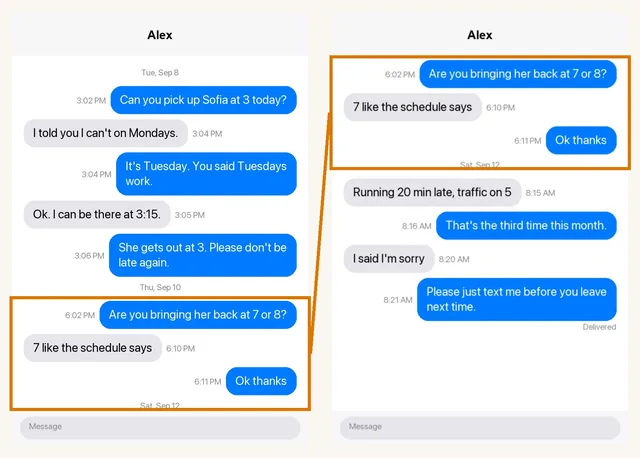
Can you pick up Sofia at 3 today?
I told you I can't on Tuesdays.
Which should you use?
If authenticity is likely to be disputed, keep both: the export for its complete timestamps, and the screenshots to show what the chat looked like, with a transcript that ties them together. If it is not disputed, organized screenshots with a transcript are usually enough and far easier to read.
Things specific to WhatsApp
- Deleted messages show as "This message was deleted". Leave that line in; it is part of the record.
- Quoted replies repeat part of an earlier message inside a new one. A good transcript records the new message, not the quoted text as a second message.
- Disappearing messages cannot be recovered once gone. Screenshot promptly.
- Do not delete the chat or uninstall WhatsApp before your matter is finished.
Common questions
Are WhatsApp messages admissible in court?
They are routinely used in court. As with any messages, the person offering them must be able to show they are what they claim to be, usually by testifying that they came from their own phone and were not altered. The decision to admit them belongs to the court.
Does the WhatsApp export show read receipts or ticks?
No. The export is text only. If delivery or read status matters, screenshots that show the ticks, or the message info screen, are the way to capture it.
Can I export a WhatsApp chat as a PDF?
Not directly; WhatsApp exports a text file. You can print that file to PDF, or build a formatted PDF transcript from screenshots.
Turn your screenshots into a transcript PDF for court →More guides: Print texts for court from an iPhone · Print texts for court from Android · Can screenshots be used in court? · How to organize screenshots for court · How to get a transcript of text messages · How to authenticate text messages for court · Turn text messages into a PDF · How to prepare text messages for court · Best way to get text messages for court · Can text messages be used in court? · Are text messages admissible in court? · Decipher TextMessage or iMazing for court? · TextExhibit alternatives for court · iMazing alternatives for printing texts for court · Decipher TextMessage alternatives · SMS Backup & Restore to a court PDF · Can you get text message records from your carrier? · Print Messenger, Instagram or Snapchat messages for court · ThreadProof vs Court Texts · What evidence do you need for a restraining order · How to submit evidence in family court · Best apps to print text messages for court · How to save a text conversation · How to send a text conversation to email