How to authenticate text messages for court
Published September 17, 2026 · Updated October 28, 2026
Short answer: usually by your own testimony that these are messages between you and the other person, taken from your own phone and not changed, backed up by details in the messages such as the phone number, the dates and replies that fit.
"Authentication" sounds technical, but it is a simple idea: before a court relies on your messages, someone has to show they are what you say they are, meaning real messages, from that person, not altered. This guide explains how that is normally done. It is general information, not legal advice, and the rules of your own court control.
The basic rule
In US federal courts the rule is Federal Rule of Evidence 901: the person offering an item must produce evidence sufficient to support a finding that the item is what they claim it is. State courts have their own versions, and most are similar. The bar is not proof beyond doubt. It is enough evidence that a reasonable person could conclude the messages are genuine.
The usual ways it is done
- Your own testimony. You say, under oath or in a signed declaration, that these are messages between you and the other person, that you took the screenshots or made the export from your own phone, and that nothing was changed. For most everyday cases this is the main method.
- Details inside the messages. The contact name and phone number, references to things only the two of you would know, nicknames, the way the person writes, and replies that fit the conversation all point to who was on the other end.
- The other person admits it. If they acknowledge sending the messages, in testimony, in their own filings or in later messages, authentication is rarely an issue.
- Records from the phone or carrier. A device export with stored timestamps and numbers, or carrier records showing that messages passed between the two numbers at those times, support the rest.
- A forensic examiner. For high-stakes or criminal matters, or where forgery is seriously alleged, an expert extracts the messages from the device and testifies about it.
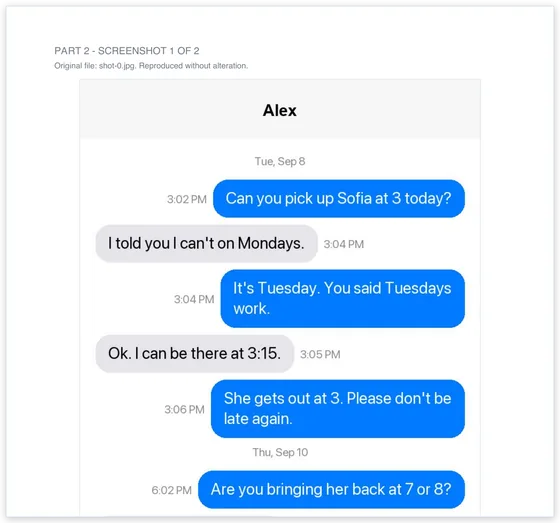
Can you pick up Sofia at 3 today?
I told you I can't on Tuesdays.
What commonly goes wrong
- No phone number visible. A screenshot showing only a first name does not show whose number it was. Take one screenshot of the contact card or the top of the thread showing the number.
- No dates. Include the screenshots where date lines appear, or be ready to state the dates from your own knowledge.
- Cropped or selective images. Missing context invites the claim that you hid something.
- Edited images. Highlights, arrows and redactions on the evidence itself make authenticity harder to defend.
- The phone is gone. If you still have the device with the conversation on it, keep it that way until the matter ends.
Preparing your messages so this is easy
- Capture the full conversation with overlapping, unedited screenshots, including the date lines and one image showing the other person's number.
- Present a numbered transcript with the original screenshots attached, so every line can be checked against its source.
- Write a short declaration: who you are, whose messages these are, how and when you captured them, and that they are complete and unaltered. Your court may have a form for this.
- Keep the phone and the original images.
Common questions
Do I need an expert to authenticate text messages?
Usually not. In most civil and family matters, the testimony of a person who took part in the conversation is the normal way messages are authenticated. Experts come in when authenticity is seriously contested or the stakes are high.
Can the other side just say the texts are fake?
They can say it, but a bare denial often is not enough against consistent, complete messages backed by your testimony, the phone number, and the context. If they raise it seriously, stronger evidence such as a device export or carrier records may be needed.
Do screenshots need to be notarized?
Notarizing a screenshot does not prove the messages are genuine; a notary only confirms who signed a document. What courts look for is testimony or a declaration from someone with knowledge, which some courts require to be sworn or signed under penalty of perjury.
Turn your screenshots into a transcript PDF for court →More guides: Print texts for court from an iPhone · Print texts for court from Android · Can screenshots be used in court? · How to organize screenshots for court · How to get a transcript of text messages · Print WhatsApp messages for court · Turn text messages into a PDF · How to prepare text messages for court · Best way to get text messages for court · Can text messages be used in court? · Are text messages admissible in court? · Decipher TextMessage or iMazing for court? · TextExhibit alternatives for court · iMazing alternatives for printing texts for court · Decipher TextMessage alternatives · SMS Backup & Restore to a court PDF · Can you get text message records from your carrier? · Print Messenger, Instagram or Snapchat messages for court · ThreadProof vs Court Texts · What evidence do you need for a restraining order · How to submit evidence in family court · Best apps to print text messages for court · How to save a text conversation · How to send a text conversation to email