How to turn text messages into a PDF
Published September 17, 2026 · Updated October 28, 2026
Short answer: screenshot the conversation and turn the screenshots into one PDF; on a Mac you can also print the conversation from Messages, and on Android an SMS backup app can print it.
Neither iPhone nor Android has an "export conversation as PDF" button. Here are the methods that actually work, starting with the free ones, and what each is good for.
iPhone
Screenshots, then a transcript PDF
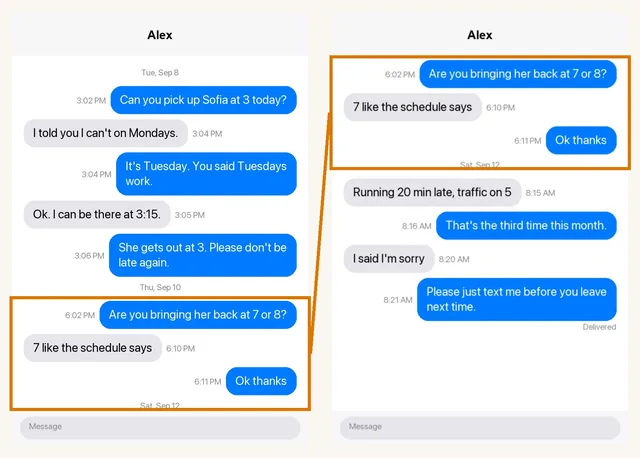
Screenshot the conversation from the oldest message to the newest, overlapping each one slightly. To show exact times, drag the conversation to the left and hold while you screenshot. Upload the set to Court Texts and you get a single PDF with the messages typed out in order, who sent each one, dates and times where visible, and every original screenshot attached. No computer needed.
Print from a Mac
If iCloud Messages is on and you have a Mac: open Messages, select the conversation, scroll up to load what you need, then File, Print, Save as PDF. Free, but it produces one long unnumbered run and you cannot do it from the phone alone.
Screenshots pasted into a document
You can paste screenshots into Pages, Word or Google Docs and export a PDF. It is free and fine for a handful of messages. Past a dozen screenshots it becomes slow, the text is not searchable, and nothing is numbered.
Android
Screenshots, then a transcript PDF
Same approach as iPhone. In Google Messages, tap a bubble to show its time before you screenshot. Court Texts reads Android Messages, Samsung Messages and WhatsApp screenshots alike.
An SMS backup app
Apps such as SMS Backup & Restore can save SMS and MMS conversations to a file, and some will print that to PDF. You get stored timestamps for every message. The output is plain, and photos often come separately.
Can you pick up Sofia at 3 today?
I told you I can't on Tuesdays.
Which method should you use?
| You want | Use |
|---|---|
| A quick record of a few messages | Screenshots pasted into a document |
| A readable, numbered PDF for a lawyer, HR or a court | Screenshots turned into a transcript PDF |
| Years of messages, every timestamp | A backup-based export (iPhone) or SMS backup app (Android) |
| Proof a message was not altered | A device export or forensic extraction, with advice from a lawyer |
Tips for a PDF people can actually read
- Turn off dark mode before you screenshot if you plan to print; it saves ink and reads better on paper.
- Include the screenshot where a date line appears above the first message.
- Take one screenshot showing the other person's name and number.
- Keep the original screenshots even after you have the PDF.
Common questions
Can I save an entire iMessage conversation as a PDF on my iPhone?
Not with a built-in button. You can screenshot the conversation and build a PDF from the screenshots, or use a Mac with synced Messages to print the conversation to PDF.
Is there a free way to convert text messages to PDF?
Yes: on a Mac, print the conversation from Messages to PDF; on any phone, paste screenshots into a document and export it as PDF. Court Texts reads the first six screenshots free so you can see the result before paying for the full PDF.
Will the PDF show dates and times?
It shows whatever dates and times are visible in your screenshots. WhatsApp prints a time in every bubble. iMessage prints date lines only after gaps, so include the screenshots where those lines appear.
Turn your screenshots into a transcript PDF for court →More guides: Print texts for court from an iPhone · Print texts for court from Android · Can screenshots be used in court? · How to organize screenshots for court · How to get a transcript of text messages · Print WhatsApp messages for court · How to authenticate text messages for court · How to prepare text messages for court · Best way to get text messages for court · Can text messages be used in court? · Are text messages admissible in court? · Decipher TextMessage or iMazing for court? · TextExhibit alternatives for court · iMazing alternatives for printing texts for court · Decipher TextMessage alternatives · SMS Backup & Restore to a court PDF · Can you get text message records from your carrier? · Print Messenger, Instagram or Snapchat messages for court · ThreadProof vs Court Texts · What evidence do you need for a restraining order · How to submit evidence in family court · Best apps to print text messages for court · How to save a text conversation · How to send a text conversation to email