How to submit evidence in family court
Published October 21, 2026 · Updated October 28, 2026
Short answer: turn everything into labelled exhibits on paper or PDF, give a copy to the other side before the hearing in the way your court requires, bring three copies, and be ready to say in one sentence what each exhibit is and where it came from. Judges refuse evidence far more often for how it was presented than for what it says.
This is general information. Family courts set their own procedures, sometimes judge by judge, so check your court's local rules, the notice of hearing, and the self-help centre.
Exhibits, not piles
An exhibit is one document or one photo or one recording, with a label. Courts commonly use letters for one party and numbers for the other, or a prefix like "Petitioner's Exhibit 1". Each exhibit gets a sticker or label on its first page, the pages are numbered, and an exhibit list at the front says what each one is. You can add the labels and an index to a set of PDFs and photos with our free exhibit sticker tool, which runs in your browser.
The three usual ways evidence reaches the judge
- Attached to a declaration. For motions and requests for orders, exhibits are attached to your written declaration and filed with it. The declaration says what each exhibit is. Page limits apply, so choose.
- Exchanged before the hearing. Many courts order both sides to exchange exhibit lists and copies a set number of days before trial. Missing that deadline is the most common reason an exhibit is excluded.
- Brought to the hearing. Three copies: the judge's, the other party's and yours. Some courts want them in binders with tabs; some want a USB or an upload to an evidence portal for video and audio. Ask the clerk which.
Can you pick up Sofia at 3 today?
I told you I can't on Tuesdays.
Text messages
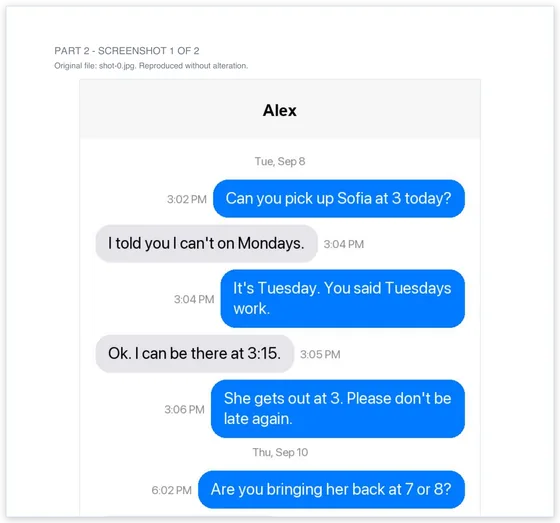
The judge needs sender, date and time on each message, the whole conversation rather than selected lines, and page numbers so everyone is looking at the same place. Screenshots in a stack rarely meet this: they overlap, repeat, and lose the date once you scroll. Court Texts reads screenshots into a numbered, dated transcript and attaches every screenshot as a labelled exhibit; a transcript like that can be marked as one exhibit with the originals behind it. Keep the phone and the original images in case the other side questions them.
Photos and video
Print photos one or two to a page with the date taken and a short caption. If the date matters, keep the original file, because sending or screenshotting a photo strips the capture date. Video is usually submitted on a USB or through the court's portal, with a printed still frame and a one-page description, and sometimes a transcript of what is said.
Audio and voicemails
Save voicemails as audio files and provide a typed transcript with the date and time of each one. Judges often want the transcript before they will listen. Check whether your state allowed you to record the conversation in the first place; rules on recording calls differ by state.
Saying where it came from
When you offer an exhibit, the judge or the other side may ask how you know it is genuine. For messages, the answer is usually simple: "These are messages between my number and his number, taken from my phone on this date, and they have not been changed." A method statement that describes how a document was prepared helps, and that is one reason Court Texts prints one in every PDF. You do not need a technical expert for your own messages in the ordinary case.
What gets evidence refused
- Not exchanged on time, or not filed when the rules required filing.
- No way to tell who wrote it or when.
- Selective screenshots that leave out your own messages.
- Offered on a phone screen instead of paper or PDF.
- Too much. A judge with twenty minutes will not read two hundred pages; pick the pages that prove the point and say that the rest is available.
A short checklist
- Decide what each exhibit proves and drop the ones that prove nothing new.
- Label and number them; make an exhibit list.
- Exchange and file by the deadline in your notice or local rules.
- Bring three copies, plus the originals of anything that might be questioned.
- Prepare one sentence per exhibit: what it is, where it came from, what it shows.
Common questions
Do I have to give the other side my evidence before the hearing?
Usually yes, by a deadline set in the local rules or the hearing notice. Surprise exhibits are routinely refused. If you are not sure, ask the clerk or the self-help centre how many days before the hearing exchange is due.
Can I email evidence to the judge?
No. Judges do not take evidence by email from a party. It goes through filing, the exchange with the other side, or the hearing itself.
How do I label exhibits?
A sticker or printed label on the first page, such as Exhibit A or Petitioner's Exhibit 1, page numbers throughout, and an exhibit list at the front. Our free exhibit sticker tool does this for PDFs and photos in your browser.
Can text messages be used in family court?
Yes, they are among the most common exhibits in custody and support cases. They need to show sender, date and time and be presented in order. See our guide on whether text messages can be used in court.
Turn your screenshots into a transcript PDF for court →More guides: Print texts for court from an iPhone · Print texts for court from Android · Can screenshots be used in court? · How to organize screenshots for court · How to get a transcript of text messages · Print WhatsApp messages for court · How to authenticate text messages for court · Turn text messages into a PDF · How to prepare text messages for court · Best way to get text messages for court · Can text messages be used in court? · Are text messages admissible in court? · Decipher TextMessage or iMazing for court? · TextExhibit alternatives for court · iMazing alternatives for printing texts for court · Decipher TextMessage alternatives · SMS Backup & Restore to a court PDF · Can you get text message records from your carrier? · Print Messenger, Instagram or Snapchat messages for court · ThreadProof vs Court Texts · What evidence do you need for a restraining order · Best apps to print text messages for court · How to save a text conversation · How to send a text conversation to email