How to organize screenshots of text messages for court
Published September 17, 2026 · Updated October 28, 2026
Short answer: put them in date order, keep the originals unedited, number every screenshot as an exhibit, and add a typed transcript that points to each one.
If you have fifty, or two hundred, screenshots on your phone and a hearing coming up, the problem is no longer collecting evidence. It is making it readable. A judge has minutes, not hours. This is the system that works.
1. Put them in order before anything else
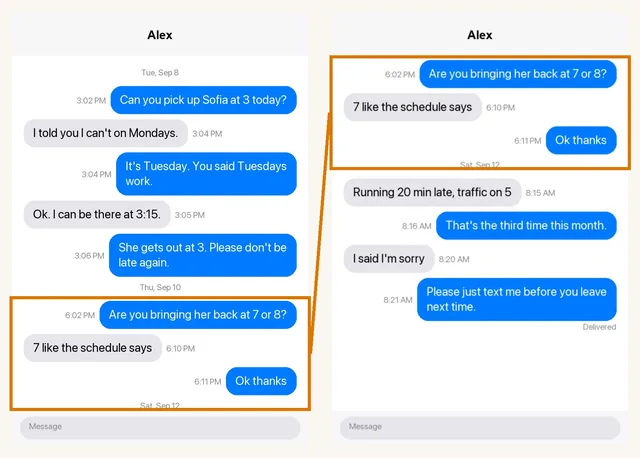
Sort by when the messages were sent, oldest first, not by when you took the screenshot. If your camera roll is out of order, use the dates printed inside the screenshots. Overlap is your friend: when the last bubble of one screenshot appears again at the top of the next, anyone can see nothing was skipped. If you were hoping the phone company could print them instead, it usually cannot; here is what carriers keep.
2. Keep the originals untouched
Do not crop, highlight, circle or annotate the images you will submit. Marked-up images invite the argument that something was altered. If you need to point at a line, do it in a separate transcript or in your written statement, and leave the image as it came off your phone. Do not delete the conversation from your phone either.
Can you pick up Sofia at 3 today?
I told you I can't on Tuesdays.
3. Number everything
Number the screenshots 1, 2, 3 in order, and number the individual messages too. "Message 42, from screenshot 9" is something a judge, a lawyer and the other side can all find in seconds. "The one where he talks about the car" is not.
4. Add a typed transcript
A stack of phone screenshots is hard to read on paper: small text, dark mode, bubbles cut in half at the edges. A typed transcript that lists each message with who sent it, the date and the time, and which screenshot it came from, lets the reader follow the conversation and check any line against its source. The screenshots then become the backing evidence instead of the thing the judge has to squint at.
5. Put dates on every page
iPhones only print a date line when there is a gap in the conversation, so many screenshots show no date at all. Before you screenshot, scroll up until a date appears and include that screenshot. Where a date truly is not visible, say so honestly rather than guessing, or state the date as your own knowledge and label it that way.
6. Include the whole exchange, not just the good parts
Selective screenshots are the easiest thing for the other side to attack. If you leave out the message where you were rude, they will produce it, and now you look like someone who hides things. Include the full stretch of conversation around the messages that matter.
7. Check your court's exhibit rules
Courts differ on how exhibits are labelled (numbers or letters, by party), how many copies you need, whether there is a page limit, and when they must be filed or exchanged. The clerk's office or the court's self-help centre will tell you. Follow their labelling, not yours.
A screen recording instead of screenshots
The overlap problem disappears if you record the screen while you scroll. Start a screen recording, open the chat, scroll slowly from the oldest message to the newest, and stop. Court Texts samples the video into overlapping frames on your phone and reads them like screenshots, so nothing is cut between images and the order takes care of itself. Keep the scroll steady and stay in the chat while recording.
Doing it without retyping everything
Court Texts does steps 1, 3, 4 and part of 5 for you: upload the screenshots, it reads every bubble, removes the overlap, orders the messages, and builds a PDF with a numbered transcript and every original screenshot attached unaltered, plus a statement of how the document was prepared. You review and correct it before it is built.
Common questions
How many screenshots can I submit to court?
There is rarely a fixed number, but courts expect exhibits to be relevant and organized. Dozens of pages that are numbered and in order are normal; hundreds of loose images are not. Check your court's local rules or ask the clerk about page limits.
Should I print screenshots in colour?
Colour helps because it shows which side of the conversation each bubble is on. If you print in black and white, a typed transcript that names the sender of each message matters even more.
Can I highlight the important messages?
Not on the images you submit as evidence. Keep those unaltered. Point to important messages by number in your written statement or declaration instead.
Turn your screenshots into a transcript PDF for court →More guides: Print texts for court from an iPhone · Print texts for court from Android · Can screenshots be used in court? · How to get a transcript of text messages · Print WhatsApp messages for court · How to authenticate text messages for court · Turn text messages into a PDF · How to prepare text messages for court · Best way to get text messages for court · Can text messages be used in court? · Are text messages admissible in court? · Decipher TextMessage or iMazing for court? · TextExhibit alternatives for court · iMazing alternatives for printing texts for court · Decipher TextMessage alternatives · SMS Backup & Restore to a court PDF · Can you get text message records from your carrier? · Print Messenger, Instagram or Snapchat messages for court · ThreadProof vs Court Texts · What evidence do you need for a restraining order · How to submit evidence in family court · Best apps to print text messages for court · How to save a text conversation · How to send a text conversation to email