How to save a text conversation
Published October 27, 2026 · Updated October 28, 2026
Short answer: it depends on what "save" has to do. To stop a conversation being deleted, change the phone's settings and keep a backup. To have a copy you can print, email, send to someone or keep outside the phone, save the conversation as a PDF. The steps for both, on iPhone and Android, are below.
The four ways, side by side
| Method | What you end up with | Needs | Cost |
|---|---|---|---|
| Keep messages on the phone | The conversation stays in the Messages app | A setting | Free |
| Phone backup | A copy you can restore to a phone, not read on its own | iCloud, Google account or a computer | Free to a few dollars a month |
| Export program | A file of every message from a backup | A computer and an hour | Free to about $40 |
| Save as a PDF from screenshots | One document of the whole conversation to print, email or keep | Just the phone | Free for short chats; $19 with Court Texts |
Make sure the phone keeps it
iPhone: find the Keep Messages setting and choose Forever. Depending on the iOS version it is in Settings, then Messages, or in Settings under your name, then iCloud, then Messages. If it is set to 30 days or a year, older messages are deleted automatically, from every device that syncs. Turning on Messages in iCloud keeps the conversation on your other Apple devices too, but a deletion on one device removes it from all of them, so it is a sync, not a safe copy.
Android: Google Messages and Samsung Messages keep conversations until you delete them. Check that no auto-delete or "delete old messages" option is switched on in the app's settings, and that the phone's own backup to your Google account includes SMS and MMS messages.
Can you pick up Sofia at 3 today?
I told you I can't on Tuesdays.
Back it up
A backup protects against losing the phone, but you cannot open it and read one conversation. An iCloud or computer backup of an iPhone, or a Google backup of an Android phone, restores everything to a phone; that is all it does. On Android, the free SMS Backup & Restore app is the exception: it saves texts to a file you can keep in Google Drive or on a computer, and the file can be viewed. See SMS Backup & Restore to a PDF.
Export it with a computer
Desktop programs such as iMazing and Decipher TextMessage read an iPhone backup and export a conversation with the stored date, time and number on every message, as a PDF, spreadsheet or text file. They are the most complete copy you can make yourself and the right choice for a very long history. They need a Mac or PC, a cable and some patience. If your messages sync to a Mac, the Messages app there can also print a conversation to PDF for free. Compared in Decipher TextMessage or iMazing.
Save the conversation as one PDF, from the phone
For a copy you can actually use, printed, emailed, sent to a lawyer, HR or a family member, or kept in Files, a single PDF of the conversation is what most people want. Without a computer:
- Scroll to the first message you want to keep.
- Take a screenshot, scroll so the last bubble is still on screen, and take the next one. Repeat to the newest message. On iPhone, drag any bubble to the left first to show the time of every message.
- Upload the screenshots to Court Texts. It reads every bubble, works out who sent it from the side it is on, removes the overlap between screenshots, and builds a numbered, dated transcript with every screenshot attached behind it.
- Save the PDF to Files or Drive, print it, or email it from the same screen.
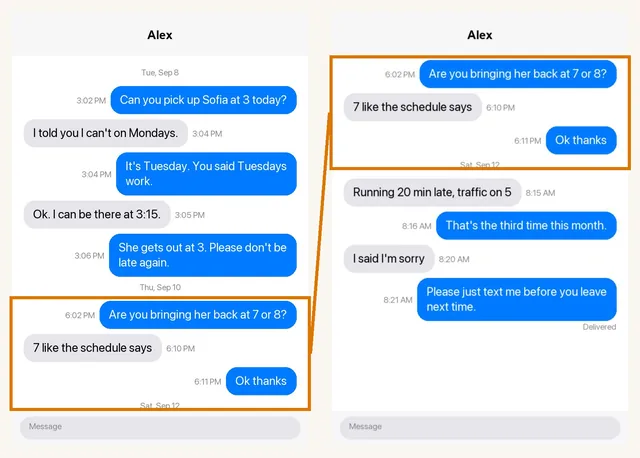
The preview is free and the first ten screenshots are read at no cost. Exporting the PDF is $19, once. A screen recording of you scrolling through the chat works instead of screenshots. It works the same for WhatsApp, Messenger, Instagram, Snapchat and group chats.
Which to use
- You just do not want to lose it: Keep Messages set to Forever, plus a regular backup.
- You need to show it to someone or keep it outside the phone: a PDF.
- Years of messages and a computer to hand: an export program.
- It may be used in court: keep the messages on the phone as well as the PDF, and see how to prepare text messages for court.
Common questions
Can I save a whole text conversation as a PDF on iPhone?
Not from the Messages app itself; there is no export or print option on the iPhone. The ways to get one PDF are a Mac that syncs your messages (File, Print, Save as PDF), an export program on a computer, or screenshots turned into a PDF on the phone with a tool such as Court Texts.
How do I save text messages before deleting them or changing phones?
Make a full backup first: iCloud or a computer for an iPhone, your Google account for Android. Moving to a new phone of the same kind restores them from the backup. For a copy you can read without a phone, save the conversations you care about as PDFs too.
Does iCloud save my text messages?
With Messages in iCloud turned on, your messages are stored in iCloud and synced across your Apple devices. It is a sync: deleting a message on one device deletes it everywhere. An iCloud backup is a separate copy, but it can only be restored to a phone, not opened to read one conversation.
How do I save a text conversation on Android?
Google Messages and Samsung Messages keep conversations until you delete them, and your Google account backup can include them. To save one conversation as a file you can read, use SMS Backup & Restore for plain texts or screenshots turned into a PDF, which also works for RCS, WhatsApp and other chat apps.
Can I save a conversation with photos in it?
Yes. Screenshots keep photos as they appeared in the conversation. In a Court Texts transcript a photo sent without text appears as an attachment line, and the screenshot attached behind the transcript shows the photo itself. Export programs save the original photo files separately.
Turn your screenshots into a transcript PDF for court →More guides: Print texts for court from an iPhone · Print texts for court from Android · Can screenshots be used in court? · How to organize screenshots for court · How to get a transcript of text messages · Print WhatsApp messages for court · How to authenticate text messages for court · Turn text messages into a PDF · How to prepare text messages for court · Best way to get text messages for court · Can text messages be used in court? · Are text messages admissible in court? · Decipher TextMessage or iMazing for court? · TextExhibit alternatives for court · iMazing alternatives for printing texts for court · Decipher TextMessage alternatives · SMS Backup & Restore to a court PDF · Can you get text message records from your carrier? · Print Messenger, Instagram or Snapchat messages for court · ThreadProof vs Court Texts · What evidence do you need for a restraining order · How to submit evidence in family court · Best apps to print text messages for court · How to send a text conversation to email